
Taxes & service charges
Define tax rates, assign them to branches by channel, and add automatic service charges.
Sofra computes tax and service charge for every order automatically from the rules you set. Rules can differ by branch and by order channel.
Tax definitions
Go to Settings → Taxes and choose Add Tax. Each definition has:
| Field | Options |
|---|---|
| Name | For example VAT, GST, Delivery fee. |
| Rate and type | Percentage (%) or a fixed amount. |
| Category | Tax (VAT, GST), Service charge, or Fee (such as a delivery fee). |
| Applies to | Per order, per item or both. |
| Description | Optional. |
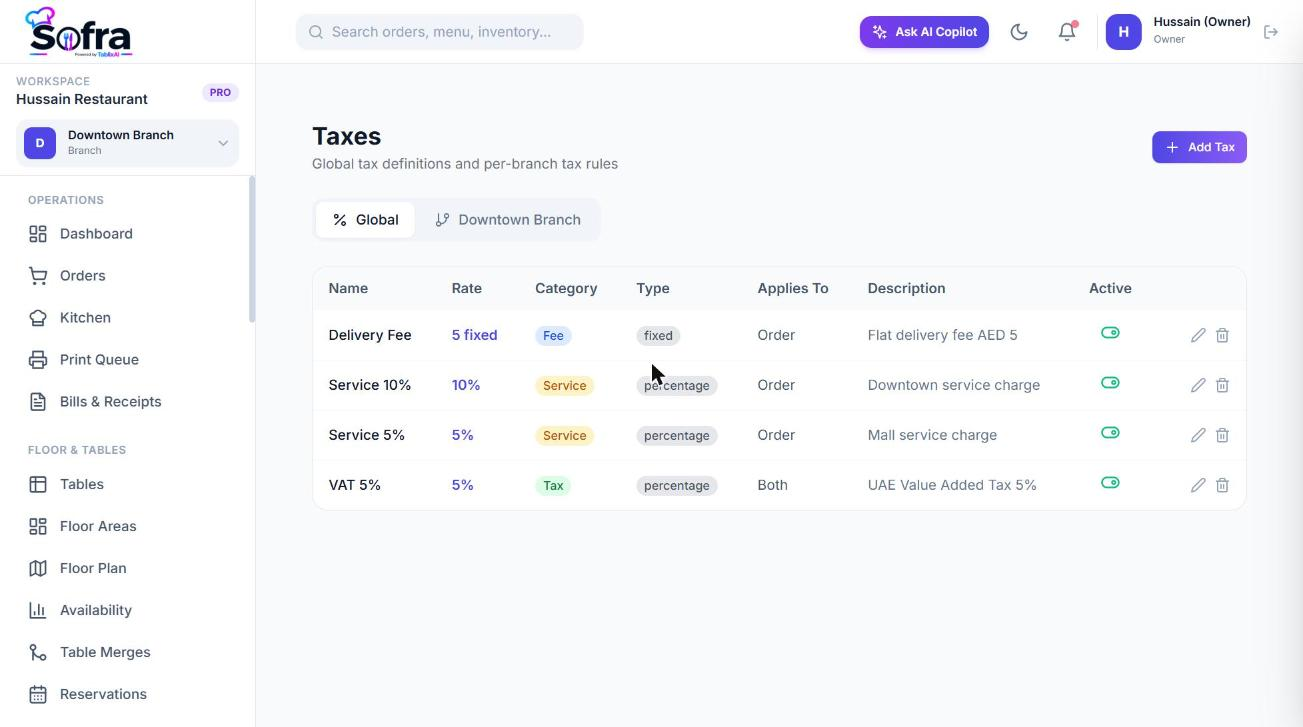
Assigning taxes to a branch
A tax only applies once it is assigned to a branch. Select the branch, open Settings → Taxes (or the branch’s Tax rules page) and choose Add Tax Rule. Pick the tax and Applies to: all channels, dine-in only, takeaway only or delivery only. Rules can be enabled or disabled without deleting them.
How an order total is calculated
- 1
Subtotal
Sum of (item price + modifier prices) × quantity.
- 2
Discounts and coupon
The order discount is taken off first, then the coupon is applied to what remains.
- 3
Taxable base
Subtotal minus discounts and coupon.
- 4
Taxes
Each tax rule for the branch and channel is applied to the taxable base. Percentage rules multiply; fixed rules add a flat amount.
- 5
Service charges
Automatic service charges matching the channel and minimum order are added.
- 6
Fees and tip
Delivery fee, packaging fee, tip and any additional charges are added.
- 7
Total
Taxable base + taxes + service charge + delivery fee + packaging fee + tip + additional charges.
The POS shows these figures live as you build an order, before it is saved.
Service charges
Go to Settings → Service Charges and choose Add Charge.
| Field | Options |
|---|---|
| Name | For example Service 10%. |
| Type and value | Percentage or fixed amount. |
| Applies to | All order types, dine-in only, takeaway only, delivery only, online only or counter only. |
| Minimum order amount | Only triggers when the subtotal reaches this amount. |
| Application | Automatic (added to every matching order) or Manual (a cashier applies it). |
| Branch | A specific branch or all branches. |
Ready to try it?
Create a free account and follow along.