Recipes & automatic stock deduction
Link menu items to ingredients so every sale deducts stock and shows its cost.
A recipe says which ingredients, and how much of each, go into one menu item. It is what lets Sofra turn a sale into stock movements and an estimated cost.
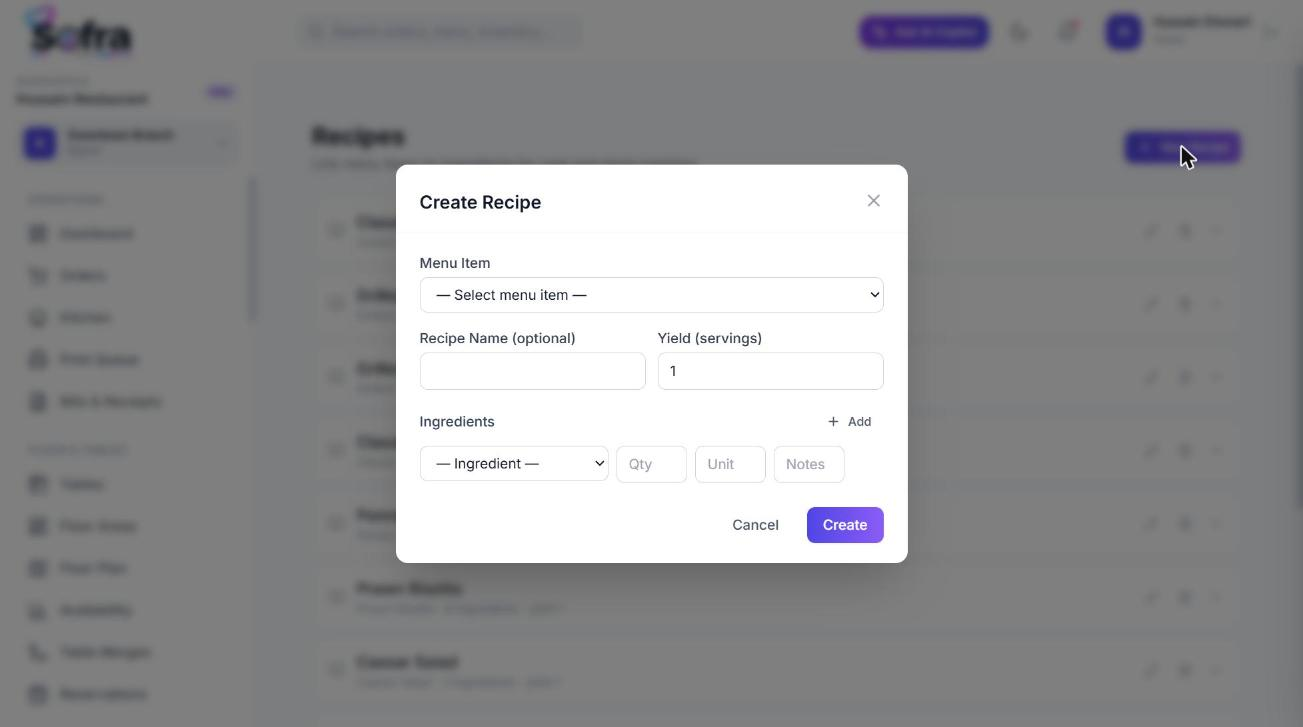
Create a recipe
- 1
Open Recipes
Go to Inventory → Recipes and choose Create Recipe, or open Recipe from a menu item.
- 2
Pick the menu item
The dish this recipe produces.
- 3
Set the yield
How many portions the recipe makes (default 1). Quantities are divided by the yield per portion sold.
- 4
Add ingredients
For each line choose the ingredient, quantity and unit.
- 5
Save
The recipe appears on the Recipes page with its estimated cost.
How deduction works
- Stock is deducted when the kitchen marks the order Ready (or Ready for pickup), for every item that has an active recipe.
- For each ingredient, Sofra adds up quantity × (portions sold ÷ recipe yield) across the order.
- It records a Consume movement per ingredient with the order number as the reference, and reduces the stock level in the branch’s main warehouse.
- Items without a recipe are ignored, so you can adopt recipes gradually.
Recipe cost
The Recipes page shows the total cost of each recipe as the sum of quantity × the ingredient’s cost per unit from its stock item. Keep cost per unit up to date when prices change so the figure stays meaningful. Compare it to the menu item’s selling price and its cost price field to understand your margin.
Ready to try it?
Create a free account and follow along.