
Branches
Locations with their own hours, tax defaults, floor, stock, staff and prefixes.
A branch is a physical location. You always have at least one: the head office created when the restaurant was made. Only owners can add, edit or deactivate branches.
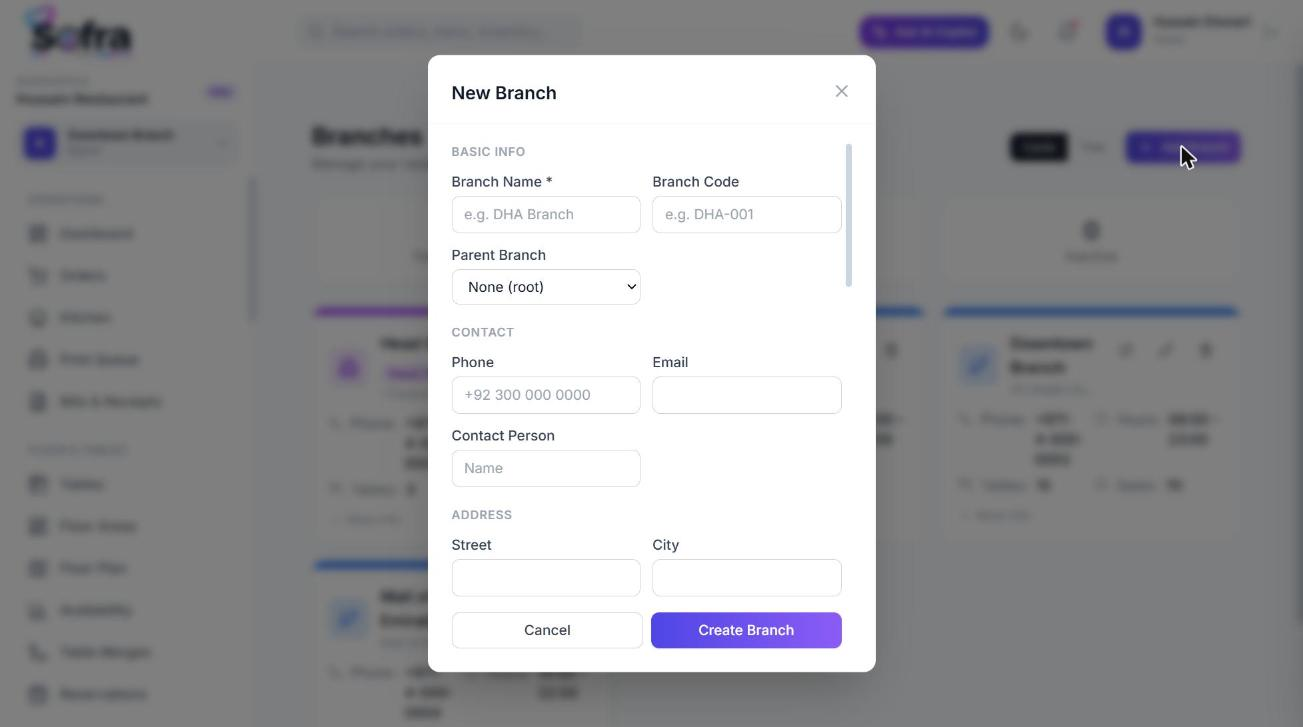
Add a branch
- 1
Open Branches
Go to Management → Branches and choose Add Branch.
- 2
Enter the basics
Name (required), code, parent branch (optional, to build a hierarchy), contact person, phone and email.
- 3
Add address and GPS
Street, city, state, country, ZIP, and optional latitude and longitude.
- 4
Set hours and timezone
Opening and closing time, timezone and currency. Overnight service is supported (for example 18:00 to 02:00). Hours drive reservation availability.
- 5
Set operations
Seating capacity, number of tables, assigned kitchens and warehouses (as free text names), and delivery zones.
- 6
Set document defaults
Order prefix (for example
ORD), invoice prefix (INV), receipt header and footer, tax rate and service charge rate defaults, and whether online orders are allowed.
The branch page
Open a branch to see a profile page with these sections:
- Details: contact, location and operations, plus receipt and invoice information.
- Floor areas, Departments and Roles that belong to this branch.
- Staff with branch access: assign staff to the branch and set their role here. See Staff, roles & departments.
- Branch tax rules: assign taxes and set which order channels each applies to. See Taxes & service charges.
- Branch menu config: assign menus and override items. See Branch menu customization.
Closed days
A branch can be closed on certain weekdays and on specific dates (with a reason, such as a holiday). Reservations cannot be booked on closed days, and the public booking page reflects them.
Deactivating a branch
- The head office cannot be deleted.
- A branch with active child branches cannot be deactivated until the children are.
- Deactivating hides the branch; it does not erase its orders or history.
Working in a branch
The branch selector at the top of the app sets the branch you are working in. Orders, tables, reservations, stock and printing all follow it. Owners and all-branch staff can switch between branches; branch-limited staff see only the branches they have been given.
Ready to try it?
Create a free account and follow along.