Billing & subscription
Subscribe, upgrade, schedule a downgrade, cancel, resume and download invoices.
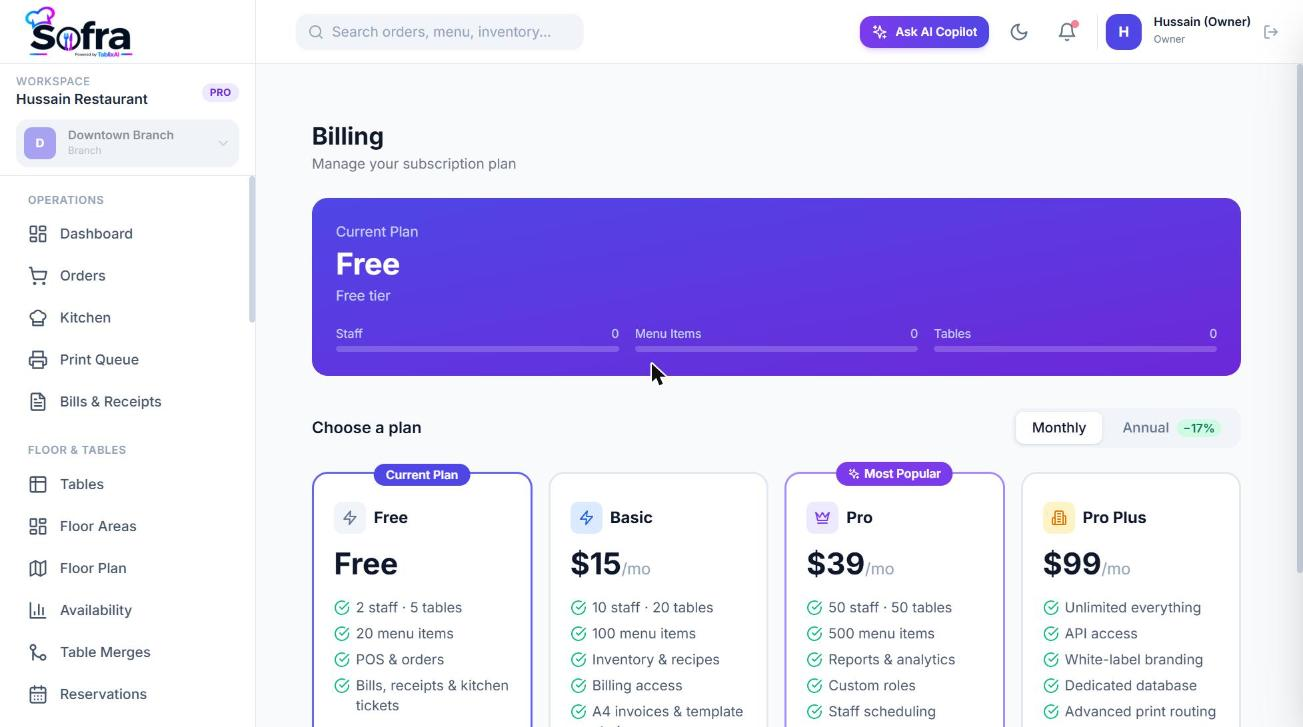
Your Sofra subscription is per restaurant. Subscription payments are processed by Paddle. Manage it from Management → Billing inside the restaurant, or from the Subscription and Billing tabs of the restaurant in the owner portal. Both use the same controls.
Subscribe to a plan
- 1
Open Billing
You see your current plan, your usage against limits and the plan cards.
- 2
Pick a cycle
Switch between Monthly and Annual (annual is 10 months’ price for 12).
- 3
Choose a plan
Select Basic, Pro or Pro Plus. A secure Paddle checkout opens.
- 4
Pay
On success the plan activates immediately; Sofra is told by a signed webhook from Paddle.
Upgrading
Choose a higher plan. Sofra shows a preview of the prorated charge and then applies the upgrade immediately. Your billing cycle stays the same.
Downgrading
- A downgrade is scheduled for the end of the current period; you keep the higher plan until then.
- It is blocked while your usage exceeds the lower plan’s limits. Sofra tells you which limits (for example “reduce staff and tables”).
- You can keep your subscription to cancel the scheduled change before it takes effect.
Cancelling and resuming
- Cancel at period end keeps access until the end of the period you have paid for, with no refund.
- Resume subscription removes a scheduled cancellation.
- When a paid subscription ends, the restaurant returns to Free limits. Data is never deleted.
Payment method and invoices
- Open the Paddle customer portal to update your payment method.
- The invoice history lists your paid and billed transactions. Download any invoice as a PDF.
- Your first payment on a paid plan is refundable within 14 days. Prices exclude VAT, GST or sales tax, which is added at checkout where required.
Subscription states
| State | Effect |
|---|---|
| Active / trialing | Everything on your plan works. |
| Past due | Payment failed. Gated features pause with a “subscription inactive” message until it is resolved. |
| Cancelled | The subscription has ended; the restaurant is limited to Free. |
Ready to try it?
Create a free account and follow along.