Prep stations & workflows
Route items to stations and define the steps each kind of dish goes through.
Prep workflows control where an item is made and what steps it goes through. They power station routing on the kitchen display and station-based print rules.
The three building blocks
| Block | What it is |
|---|---|
| Prep station | A place that prepares food: kitchen, bar, bakery, dessert, expo/pass or custom. |
| Prep workflow | An ordered list of steps (for example Ordered → Preparing → Oven → Quality Check → Ready), each optionally at a station with an estimated time. |
| Prep profile | A rule that assigns a workflow to a menu item, a category, a branch or the whole restaurant. |
Prep stations
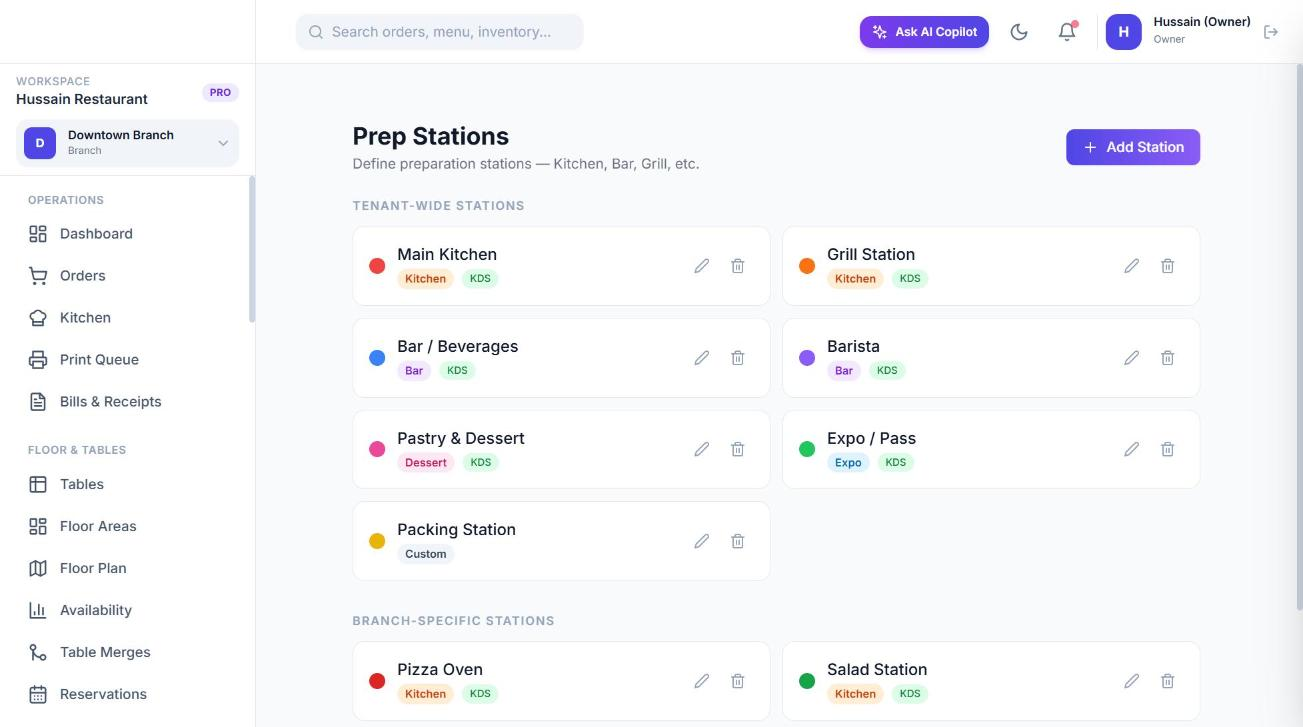
Go to Settings → Prep Stations and choose Add Station. Give it a name and type, a KDS colour, a sort order and whether the kitchen display is enabled for it. Leave the branch empty for a restaurant-wide station or pick a branch for a branch-only station.
Prep workflows
Go to Settings → Prep Workflows. Sofra ships with read-only system workflows:
| Workflow | Steps |
|---|---|
| Standard Kitchen (default) | Ordered → Preparing → Ready |
| Beverage | Ordered → Preparing → Ready |
| Pizza | Ordered → Preparing → Oven → Quality Check → Ready |
| Direct Serve | Ordered → Ready |
| Bakery | Ordered → Prep → Oven → Ready |
| Barista | Ordered → Barista Queue → Preparing → Ready |
| Delivery Pack | Ordered → Preparing → Ready → Packing → Packed |
Choose New Workflow to build your own. Give it a name, description and scope (whole restaurant or one branch), optionally make it the default for that scope, and add steps. Each step has a name, an optional station, an estimated time and a step type:
| Step type | Behaviour |
|---|---|
| Standard | A normal step the cook advances. |
| Quality check | Shows Pass and Fail on the kitchen display. |
| Packing | A post-kitchen step for takeaway and delivery. |
| Hold | Waits for a manual fire. |
Prep profiles
Go to Settings → Prep Profiles and choose Assign Workflow: pick a target type (menu item, category, branch or restaurant-wide), the workflow, the order types it applies to (dine-in, takeaway, delivery, or all), an optional station override and an optional branch scope.
Which workflow wins
When an order item is created Sofra picks one workflow, from most to least specific:
- Item profile for this branch
- Item profile for the whole restaurant
- Category profile for this branch
- Category profile for the whole restaurant
- Branch default profile
- Restaurant-wide default profile
- System default (Standard Kitchen)
Modifiers that change prep
- A modifier can inject steps after a chosen step (a quality check, packing step or hold).
- A modifier can override the station for the whole item (for example “Add espresso shot” sends the drink to the bar).
Ready to try it?
Create a free account and follow along.