
Branch menu customization
Assign menus to branches and override items, prices, channels, schedules and taxes per branch.
Branch customization lets the same global catalog behave differently in each location without duplicating anything.
Where to configure it
Select a branch in the branch selector, then open Catalog → Menus or Catalog → Menu Items. The branch tab shows each menu or item with controls to enable it, override it or mark it temporarily out. You can also open a branch’s page and choose Branch Menu Config.
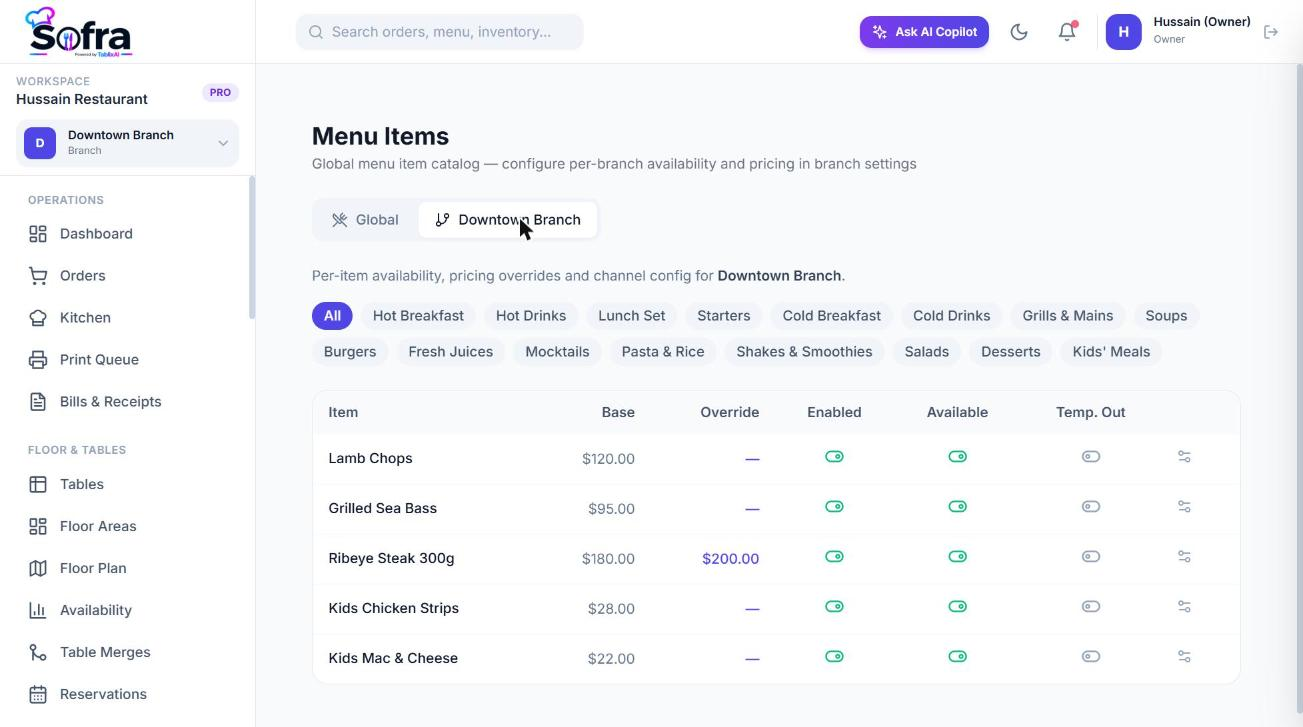
Menu assignment
- Choose which menus a branch sells and their display order.
- Give a menu a start date and end date for seasonal or special menus.
- Limit a menu to certain channels (dine-in, takeaway, delivery, online, QR).
Category overrides
- Disable a category in this branch, or mark it temporarily unavailable.
- Change its display order or give it a custom name for this branch.
- Restrict it to certain channels and set a time window and days (for example Breakfast 07:00 to 11:00).
Item overrides
| Override | Effect |
|---|---|
| Sold at this branch (enabled) | Permanently on or off for this branch. |
| Available | Live availability toggle. |
| Temporarily out of stock | Manual “out of stock today”; hides it from the POS until restored. |
| Branch override price | Replaces the base price for this branch. |
| Per-channel prices | Dine-in, Takeaway, Delivery, Online and QR prices; a channel price wins over the override price. |
| Channels | Show the item on only some channels. |
| Available from / until, days | Time-of-day and weekday window. |
| Taxes | Branch-specific tax IDs for the item. |
| Modifier overrides | Per-branch price and availability for individual modifiers. |
What the POS shows
The POS asks the server for the resolved menu for the branch and channel. An item appears only if its menu is assigned and within its dates, its category and the item are enabled and not temporarily unavailable, it is visible on the current channel, and the current time and weekday fall inside any schedule. The price shown is the channel price, else the branch override, else the base price.
Ready to try it?
Create a free account and follow along.