Kitchen display (KDS)
A live ticket screen per station: advance steps, bump, recall, set priority and fire courses.
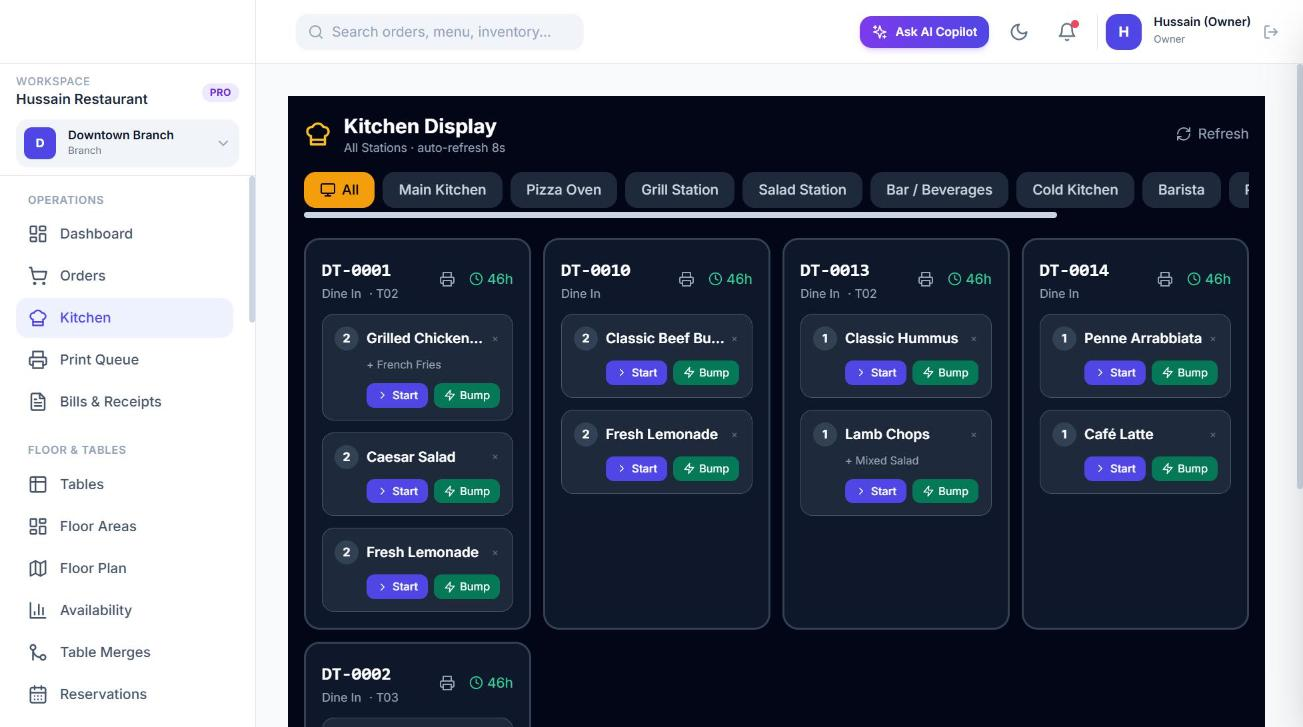
Operations → Kitchen is the kitchen display. It shows the active tickets for the selected branch and refreshes every 8 seconds. Only people with kitchen:view can open it, and kitchen:update is needed to act on tickets.
Views
- All shows every ticket for the branch.
- With stations configured, a tab per station (with its colour) shows only the items currently at that station. An item can move between stations as it advances, for example from Grill to Expo.
Reading a ticket
- Each ticket shows the order number, table or type, elapsed time, and its items with modifiers and notes.
- Urgent tickets pulse red, high priority tickets have an amber border and tickets with a pending cancel request show an orange CANCEL REQ badge.
- Items still on hold for a later course do not appear until their course is fired.
Actions on an item
| Action | Result |
|---|---|
| Advance | Completes the item’s current step and moves it to the next. On the last step the item becomes Ready. |
| Pass / Fail (quality check) | On a quality-check step you choose Pass to advance, or Fail to log the failure and inject a Rework step; the item stays at the check until it passes. |
| Bump | Marks the item ready immediately, skipping the remaining steps. |
| Recall | Pulls a bumped or ready item back to in progress, one step back. |
| Priority | Set the item to normal, high or urgent. Urgent items sort first. |
| Fail prep | Records a prep failure with a reason (for example dropped, burnt). |
| Re-prepare | Resets the item’s steps and puts it back in the queue after a failure. |
| Print ticket | Prints the kitchen ticket for the order. |
When the last item of an order is ready, the order moves to Ready (or Ready for pickup) and, for takeaway and delivery, the matching pickup or packing slip can print.
Cancel requests
If a guest cancels an item that is already being prepared, a request is raised with a reason. A person with orders:void can approve or reject it on the ticket. The item is only cancelled when approved.
Course firing
Items with a course number above 1 are held when the order is sent. The kitchen (or front of house) views a course summary for the order and fires a course to release its held items to the stations, so mains are not started while starters are still on the table.
Stock deduction
When an order is marked Ready, Sofra deducts the ingredients of each item that has a recipe from the branch’s main warehouse and records the movements. See Inventory and Recipes.
Ready to try it?
Create a free account and follow along.